 Language


Podcasts, interviews, lectures, videos, and public recordings contain valuable information that traditional HTML scraping cannot capture. Audio web scraping makes it possible to collect this content and turn spoken information into searchable, structured data for AI, research, and analytics.
A typical workflow looks like this:
Web Source → Proxy → Audio Collection → Conversion → AI Transcription → Structured Data
The challenge appears when this process scales. Large numbers of media requests can encounter rate limits, IP restrictions, regional differences, and inconsistent file formats. Residential proxies can make the collection stage more flexible, while audio-processing and speech-to-text tools handle the rest of the workflow.
What Is Audio Web Scraping
Audio web scraping is the automated collection of publicly accessible audio or media resources from websites. The source may be a direct audio file or an audio track embedded inside another media format.
Common sources include:
- Podcasts and interviews
- MP3, WAV, AAC, and M4A files
- Video audio tracks
- Lectures and conference recordings
- News and public media archives
The downloaded file is usually only the starting point. Once audio is converted into text, it can be searched, summarized, classified, or processed by other AI applications.
Why Residential Proxies Matter for Audio Scraping
Downloading a small number of public audio files is usually straightforward. At larger volumes, repeated requests from the same IP address may result in rate limits, temporary restrictions, verification pages, or inconsistent access.
RapidProxy Residential Proxies provide rotating residential IPs, sticky sessions, and geographic targeting for web data collection.
Rotating sessions are useful when collecting many independent media URLs. Sticky sessions are better when several related requests need to maintain the same IP. Geo-targeting can also help when publicly available media differs between countries, regions, or cities.
Proxy rotation should still be combined with sensible crawler behavior. Reasonable request rates, retry limits, caching, and concurrency controls remain important for building a reliable workflow.
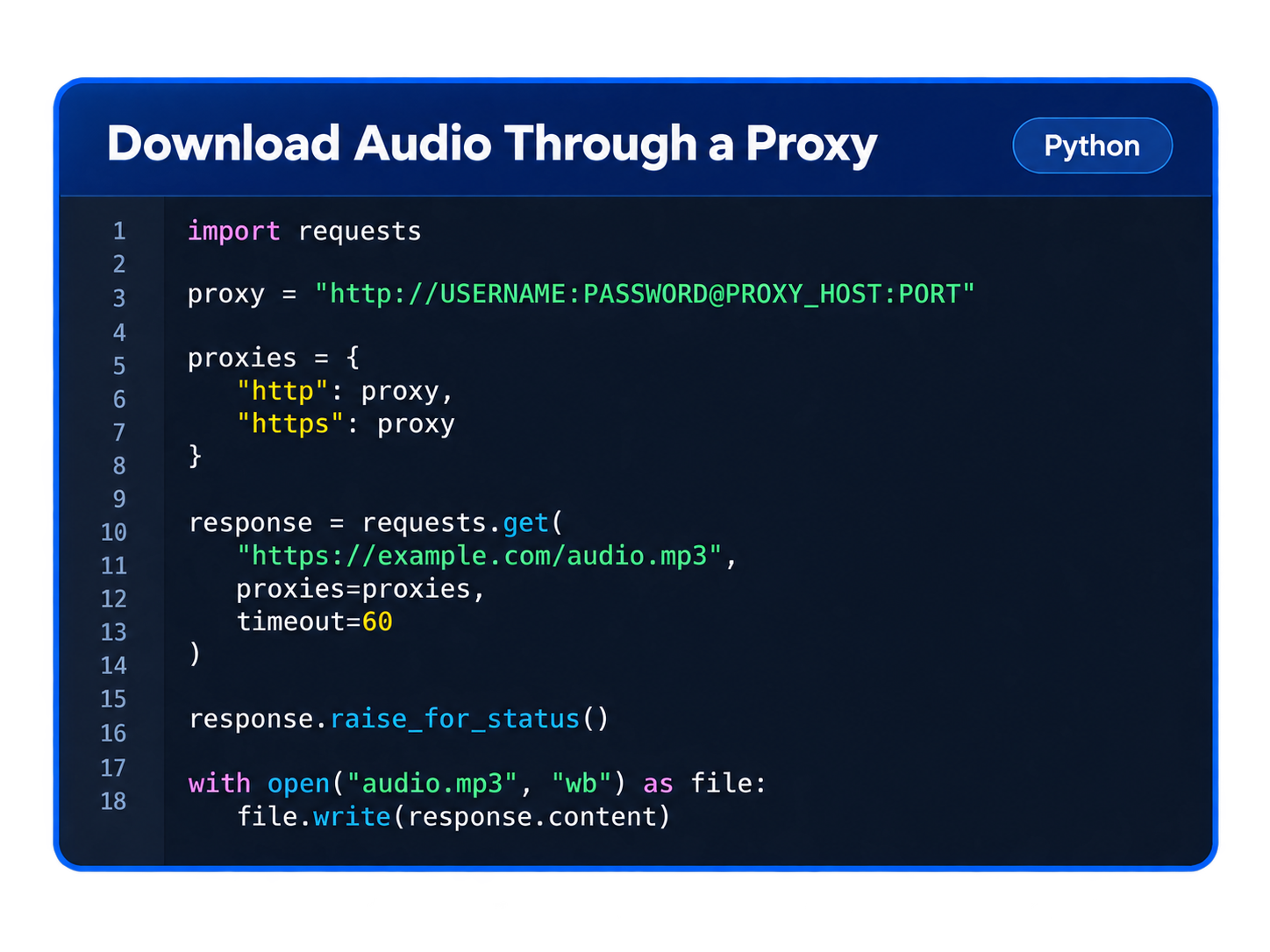
Download Audio Through a Proxy
For direct media URLs, Python's requests library can send the download through a residential proxy.
For production environments, proxy credentials should be stored in environment variables instead of directly inside the source code.
RapidProxy supports HTTP(S) and SOCKS5 connections, making the proxy layer compatible with many common HTTP clients and scraping frameworks.
Extract Audio from Video
Sometimes the required audio is contained inside a video rather than provided as a standalone file.
Tools such as yt-dlp can extract audio from supported video sources and can also route network requests through a proxy. This is useful when the video itself is unnecessary and only the audio track needs to be stored.
Removing the video portion can reduce storage requirements and make downstream processing more efficient.
Only collect content you are authorized to access, and follow applicable website terms, copyright requirements, and local laws.
Prepare Audio for AI Transcription
Audio collected from the web can arrive in many formats, codecs, channels, and sample rates. Standardizing files before transcription makes the rest of the pipeline easier to manage.
FFmpeg can convert an MP3 file into mono 16 kHz WAV audio:
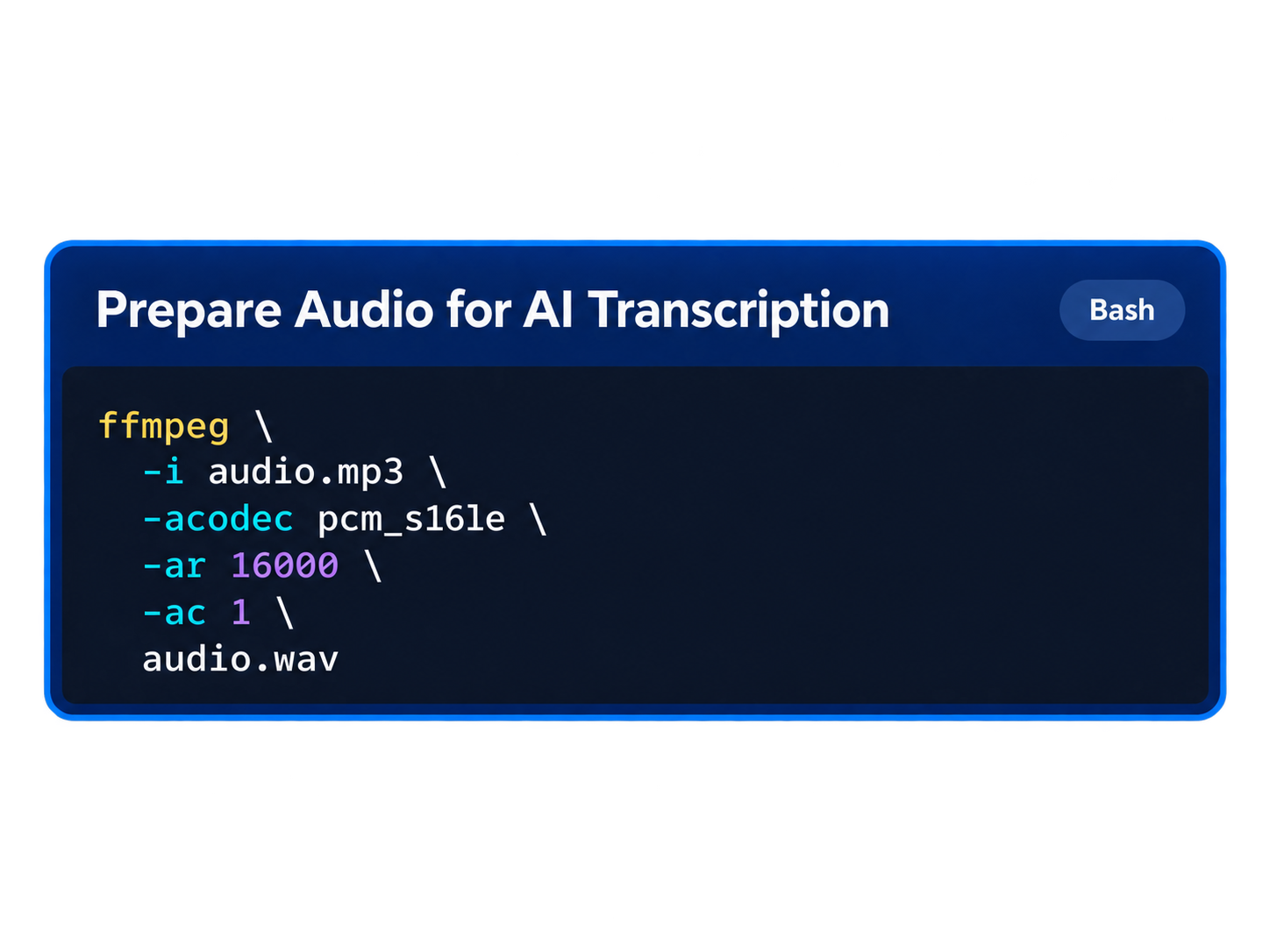
Using a consistent audio format reduces the number of media-specific cases the transcription stage needs to handle. The exact format can also be adjusted according to the requirements of the speech-to-text model being used.
Transcribe Audio with AI
Once the audio has been normalized, it can be passed to a speech-to-text model such as faster-whisper.
The model can turn spoken content into text that can then be stored in a database, indexed for search, summarized by an AI system, or converted into structured data.
For longer recordings, saving timestamps together with each transcript segment is especially useful. This allows applications to connect specific pieces of text back to exact moments in the original recording.
Scale the Audio Scraping Pipeline
Large audio scraping projects are easier to manage when collection and processing are separated.
A simple architecture can look like this:
URL Queue → Download Workers → Audio Storage → FFmpeg → AI Transcription → Database
This allows downloading, conversion, and transcription to scale independently.
At the collection stage, rotating residential proxies can distribute requests across different residential IPs. RapidProxy supports scalable concurrent connections for this type of workload, while current bandwidth options are available on the RapidProxy Residential Proxy Pricing page.
Bandwidth also matters more with media scraping than with ordinary HTML pages. Audio and video files are much larger, so filtering unnecessary downloads and caching previously collected files can help reduce both proxy traffic and storage usage.
Common Audio Web Scraping Use Cases
Once audio is converted into text, the same pipeline can support several AI and data applications.
- AI data collection — Build authorized audio-text datasets for speech and machine learning projects.
- Media monitoring — Track companies, products, people, or topics mentioned in podcasts and interviews.
- Searchable archives — Convert long recordings into searchable transcripts connected to timestamps.
- Content analysis — Apply summarization, sentiment analysis, topic classification, or entity extraction.
- Regional research — Compare public media across different geographic markets.
The real value comes from transforming unstructured speech into data that can be processed by standard search, analytics, and AI systems.
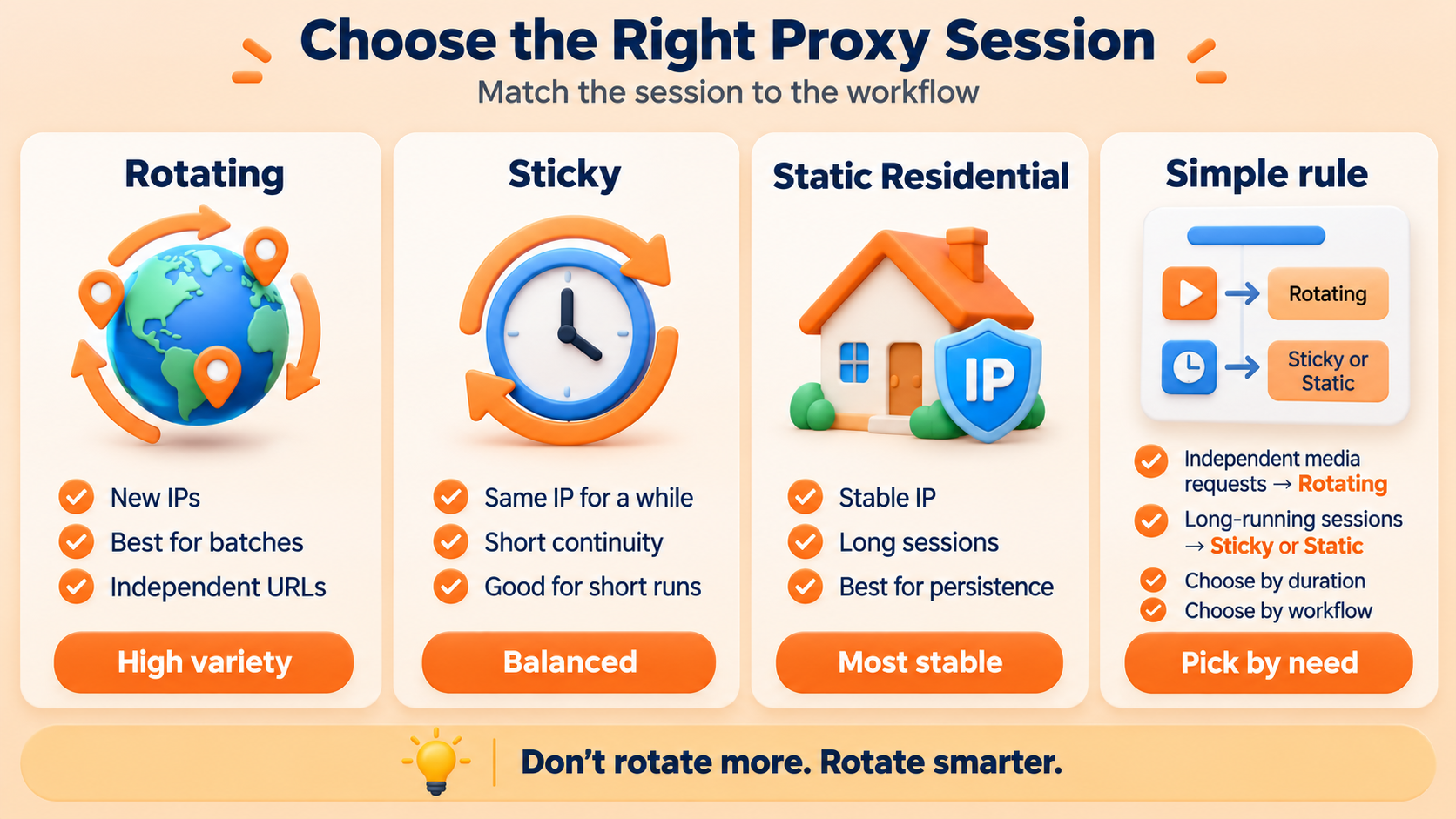
Choose the Right Proxy Session
Not every audio scraping workflow needs the same proxy behavior.
For large batches of independent media URLs, rotating residential proxies are usually the better fit because IPs can change between requests. Sticky sessions are useful when short-term continuity is required.
If the same residential IP needs to remain stable for much longer, RapidProxy Static Residential Proxies can provide a more suitable option.
A simple rule is:
Independent media requests → Rotating residential proxies
Long-running sessions → Sticky or static residential proxies
The goal is not to rotate as often as possible. The better approach is to choose the session behavior that matches the target workflow.
Best Practices for Reliable Audio Scraping
Residential proxies solve only the network portion of an audio scraping system. Reliable collection also requires sensible request rates, connection timeouts, retry limits, exponential backoff, and caching.
For production workloads, monitor HTTP status codes, failed downloads, file sizes, conversion failures, transcription errors, processing time, and bandwidth usage separately. These metrics make it easier to identify whether a problem originates in collection, media processing, or AI transcription.
Selective collection is equally important. Downloading only the media required for the project can significantly reduce storage, bandwidth, and processing costs.
Conclusion
Audio web scraping can transform podcasts, interviews, videos, lectures, and public recordings into structured data for AI, search, analytics, and research.
The workflow can remain simple:
Collect → Convert → Transcribe → Analyze
As collection volume grows, residential proxies can provide the IP rotation, session control, geographic targeting, and concurrency needed at the network layer.
RapidProxy Residential Proxies provide rotating and sticky sessions, geo-targeting, HTTP(S) and SOCKS5 support for scalable web data collection.
For workflows that require a persistent IP, RapidProxy Static Residential Proxies provide a stable alternative.
With the right proxy strategy and audio-processing stack, developers can build a cleaner and more scalable pipeline from web media to AI-ready data.




 Flux Stream Network Limited
  RM A5,7/F, ASTORIA BUILDING, NO.34 ASHLEY ROAD, TSIM SHA TSUI, HONG KONG