 Language


Our product binds one proxy session to each device and account, then logs IP checks and connection errors.
Dashboard shows sticky session health, device bindings, and network checks for account workflows.
Appilot's Social Media Proxies
Appilot's Social Media Proxies is a working network-session layer for approved social workflows on physical phones or isolated environments. It assigns a proxy route to an account, keeps that route stable when continuity matters, checks the public IP before activity starts, and records connection failures. Built by Appilot, it treats the proxy as one part of the automation stack, not a shortcut around platform rules.
A proxy changes the source IP address a platform sees; it does not decide what the account does. Scheduling, action limits, device state, approvals, and logs remain separate. A stable route cannot compensate for inconsistent devices, aggressive pacing, poor account history, or activity that violates platform rules.
Why the network layer matters
Account operations often mix devices, locations, and scheduled jobs. Without explicit routing, an account can reconnect through the wrong region or reuse another device's path. The tool keeps assignments visible, validates the route before a run, and records what changed.
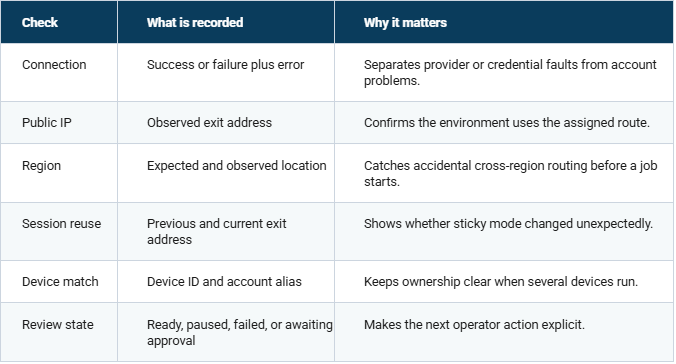
For broader market context, DataReportal's Digital 2026 Mid-Year Global Update covers global social and mobile use, while Cloudflare's 2025 Radar Year in Review covers internet traffic patterns. We use those reports as context, not as proof that any proxy configuration is safe for a specific platform. In this build, the preflight records 4 checks before scheduler handoff: connection, public IP, region, and device match.
Core Features
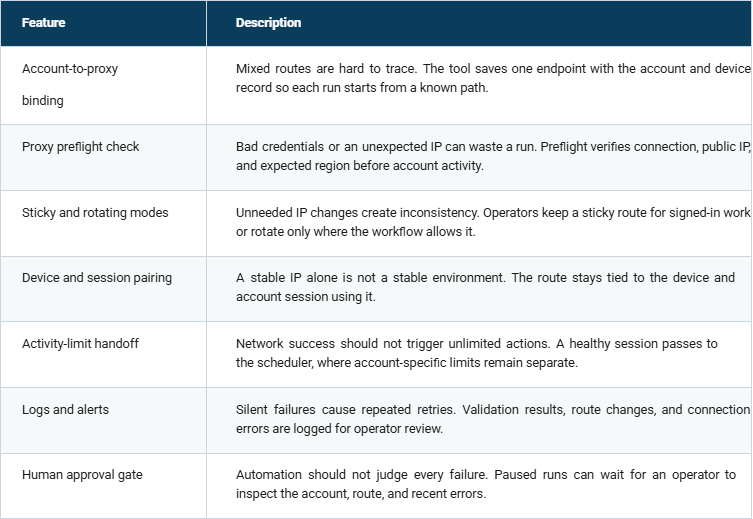
Proxy types for different jobs
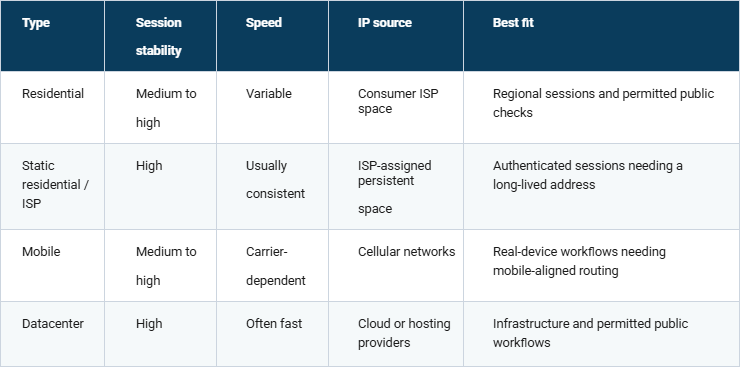
Endpoint choice depends on the workflow. The build handles 4 route classes: residential, static residential or ISP, mobile, and datacenter. None is automatically safer or compliant. Match the type to the session, region, provider sourcing, uptime needs, authentication method, and platform rules. The connector accepts HTTP, HTTPS, and SOCKS5 when the selected provider supports them.
Sticky sessions and rotation
A sticky session keeps the same exit address for a defined period. That is easier to reason about for authenticated work because account, device, and network identity remain consistent. Rotation changes the exit address between requests or jobs and suits permitted public-data workflows that do not depend on a logged-in session.
The tool records current exit IP, session mode, region, and assignment time. It changes a route only when the configured workflow calls for it, and logs endpoint failure before using a replacement.
Real-device automation stack
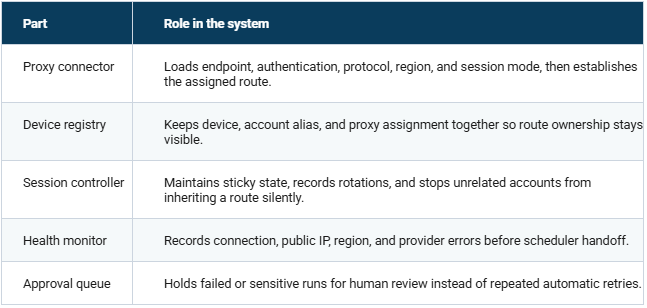
The path is proxy connection → device or isolated environment → account session → scheduler → activity limits → logs and alerts → human approval. Separating layers keeps a proxy error a network problem, a pacing rule an automation rule, and an account review a human decision.
For device-side customization, Appilot's real-device social media automation services cover deployment, integrations, new controls, monitoring, and maintenance around the same stack.
Platform checks that change the setup
For Instagram, keep device state, account session, route region, and pacing changes explainable. Verification events should pause the workflow, not trigger repeated retries. Appilot's Instagram follow and unfollow bot shows the related device-led path.
For TikTok, mobile context and account-specific limits matter more than forcing every account through one script.
Routing stays per account while timing stays with the scheduler. The TikTok follow bot is the related automation path.
For Reddit, community rules, publishing cadence, reputation, and review matter. Operators should check Reddit's current developer and data-access rules before automated publishing or collection. The Reddit post scheduler pairs scheduling with human review rather than network masking.
How the project is put together
The runtime uses Python 3 for configuration, network checks, scheduling handoff, and logs. Appium connects route state to real-device automation. SQLite keeps assignments, health results, and review events locally so the controller can recover after a restart without a separate database service.
Checks before a session is trusted
Use Cases
Keep regional sessions traceable by assigning each device and account a known route, then checking location before scheduled work.
Separate account environments so one device does not silently reuse another account's endpoint or session state.
Use rotation only for workflows that permit it while authenticated work stays on stable sessions.
Investigate failures from connection logs, IP checks, and review states instead of guessing whether the fault is network or automation.
Choosing a route without adding instability
Choose from the workflow outward: authenticated account work usually needs continuity, while permitted public-data jobs may tolerate rotation. Then check required region, provider sourcing, sticky-session duration, uptime history, authentication method, and protocol support. Avoid unnecessary IP changes, shared assignments you cannot explain, blind retries, and region changes that do not match the device or campaign context.
Setup checks before the first run
1. Choose the endpoint type that fits the workflow, and use a provider that documents how its IPs are sourced.
2. Set the required region and verify the observed exit location.
3. Assign one stable environment to each authenticated account.
4. Test credentials, protocol, public IP, and region before account activity.
5. Connect device automation only after preflight returns a healthy state.
6. Keep account-specific activity limits in the scheduler.
7. Pause on connection errors, verification events, or unexpected route changes instead of retrying blindly.
8. Add devices gradually so each new environment can be checked before more are introduced.
How to Bind an Account Session Using Appilot's Social Media Proxies
1. STEP 1 — Download & Set Up the Project Download, set up, and install Appilot's Social Media Proxies to get the project running. If you hit any difficulty, contact us here.
2. STEP 2 — Open Device Map Open the dashboard and select the device and account alias that should own the route.
Confirm the saved environment before editing proxy settings.
3. STEP 3 — Assign the Session Enter proxy host, authentication, protocol, region, and session mode. For sticky mode, set the provider-supported session duration before saving the assignment.
4. STEP 4 — Run Preflight Press Run Preflight. The tool returns connection status, public IP, observed region, device match, and review state before handing a healthy session to the scheduler.
What the tool does not promise
A clean proxy connection does not guarantee that an account will avoid verification, limits, or enforcement. Platforms evaluate more than IP address, and rules can change. The system makes routing stable, observable, and reviewable; it does not hide prohibited behavior or bypass security controls. Operators remain responsible for platform terms, permissions, data-access rules, and scheduled actions.
How to Evaluate a Proxy Provider for Social Workflows
he proxy type is only one part of the selection process. Two providers may both advertise residential or mobile proxies while offering very different levels of IP quality, location accuracy, session control, support, and reliability. Before connecting a provider to Appilot, teams should compare what the provider offers with the actual requirements of their workflow. Start by reviewing how the provider sources its IP addresses. A reputable provider should clearly explain how addresses enter its network and whether users have consented to participate. Unclear sourcing can introduce legal, reputational, and reliability risks that technical configuration cannot eliminate. Next, examine the available location controls. Country-level targeting may be sufficient for general research, while regional campaigns may require state or city selection. More precise targeting can reduce the available IP pool, increase costs, or affect connection performance. Location accuracy should therefore be tested during preflight instead of being assumed from the provider’s dashboard. Session controls also require practical validation. Teams should determine: - How long a sticky session remains active - What causes a session to expire - Whether the same session identifier returns the same IP address - How the provider handles unavailable endpoints - Whether rotation occurs per request, after a time interval, or manually Appilot records the observed IP, region, and session state so operators can compare actual provider behavior with the selected configuration. Authentication methods, protocol support, concurrency limits, usage reporting, documentation, and customer support should also be evaluated. A cheaper proxy plan can become expensive when connection failures regularly interrupt workflows or require manual troubleshooting. The best provider is not necessarily the one advertising the largest IP pool. It is the provider that makes routing predictable, observable, and manageable for the intended workflow.
Designing an Account-to-Proxy Assignment Policy
A written assignment policy prevents proxy decisions from becoming inconsistent as more accounts and devices are added. The policy should define: - Which account owns each proxy route - Which device is authorized to use it - The expected country or region - Whether the session should remain sticky or rotate - The approved session duration - The conditions that require operator review - Who is authorized to modify the assignment For authenticated workflows, use an internal account alias instead of exposing account credentials in proxy logs. Pair that alias with the device identifier, provider reference, expected region, session mode, and assignment date. If an account must move to another authorized device, treat the transfer as a controlled configuration change. Stop scheduled jobs, validate the new environment, run proxy preflight, and record who approved the change before restarting activity. The policy should also define which resources cannot be shared. A proxy assigned to one client should not automatically become available to another client simply because it has unused capacity. Keeping environments separated protects client data and makes troubleshooting easier. Exceptions should be temporary and visible. If a primary endpoint fails and an approved replacement is used, record the reason, replacement region, start time, and reviewer. Automatic switching without an audit trail may keep a job running, but it makes later problems much harder to investigate.




 Flux Stream Network Limited
  RM A5,7/F, ASTORIA BUILDING, NO.34 ASHLEY ROAD, TSIM SHA TSUI, HONG KONG